
This feature is unavailable to 1.x customers. For customers not on automated deployments, dashboard additions, enhancements, and resolved issues require a separate dashboard upgrade. When contacting Support, request upgraded dashboards.
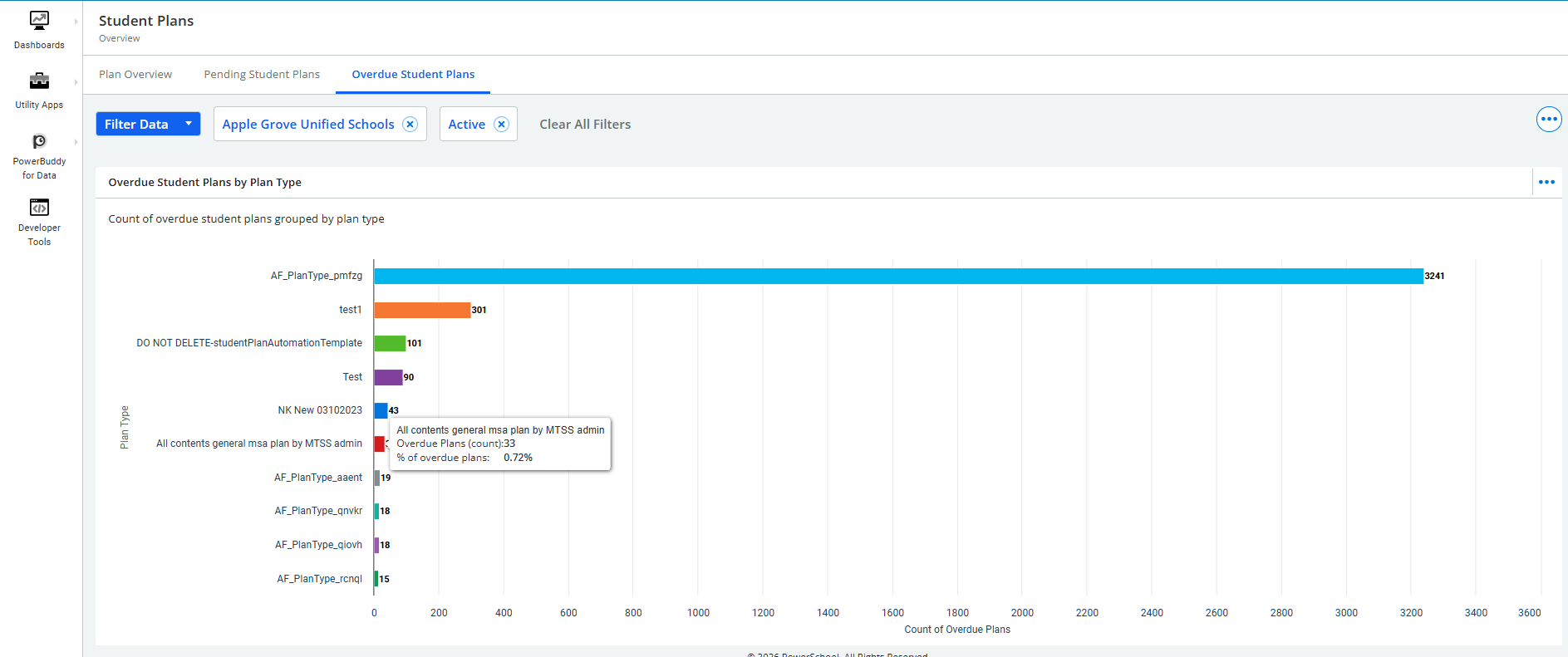
The Overdue Student Plans Dashboard displays active plans whose end dates have passed without being completed or closed. These overdue plans indicate potential lapses in follow‑up and may signal that students have not received required services or that progress monitoring has not been finalized.
The Overdue Student Plans Dashboard provides visibility into plans that remain active even though their end dates have passed.
-
Counts and percentages of overdue plans by Plan Type, Plan Name, and Location.
-
Open the Dashboard
Navigate to Student Plans and select the Overdue Student Plans tab at the top of the page.
This loads the dashboard that displays metrics for all overdue plans. -
Apply Filters to Refine Results
Use the filter controls at the top of the page to adjust the data displayed. These include:
-
School Selector – Choose a specific school or review district-wide overdue plans.
-
Clear All Filters – Reset all filters to return to the full dataset.
-
View Data and Drill down
-
Hover over a bar to view the exact count and the percentage of total overdue plans.
-
Select a bar to drill through to a detailed student list for the selected Plan Type / Plan Name / Location, using the current filters.
-
Access Student-Level Plan Information
After selecting a bar, the system displays a list of students associated with that overdue plan type. From this list, users may:
-
Open individual student records
-
Review plan history and documentation
-
Take corrective actions within the standard student plan workspace (e.g., updating or closing a plan)
Note: The dashboard itself is metric‑only and does not include direct plan‑editing actions.