
This feature is unavailable to 1.x customers. For customers not on automated deployments, dashboard additions, enhancements, and resolved issues require a separate dashboard upgrade. When contacting Support, request upgraded dashboards.
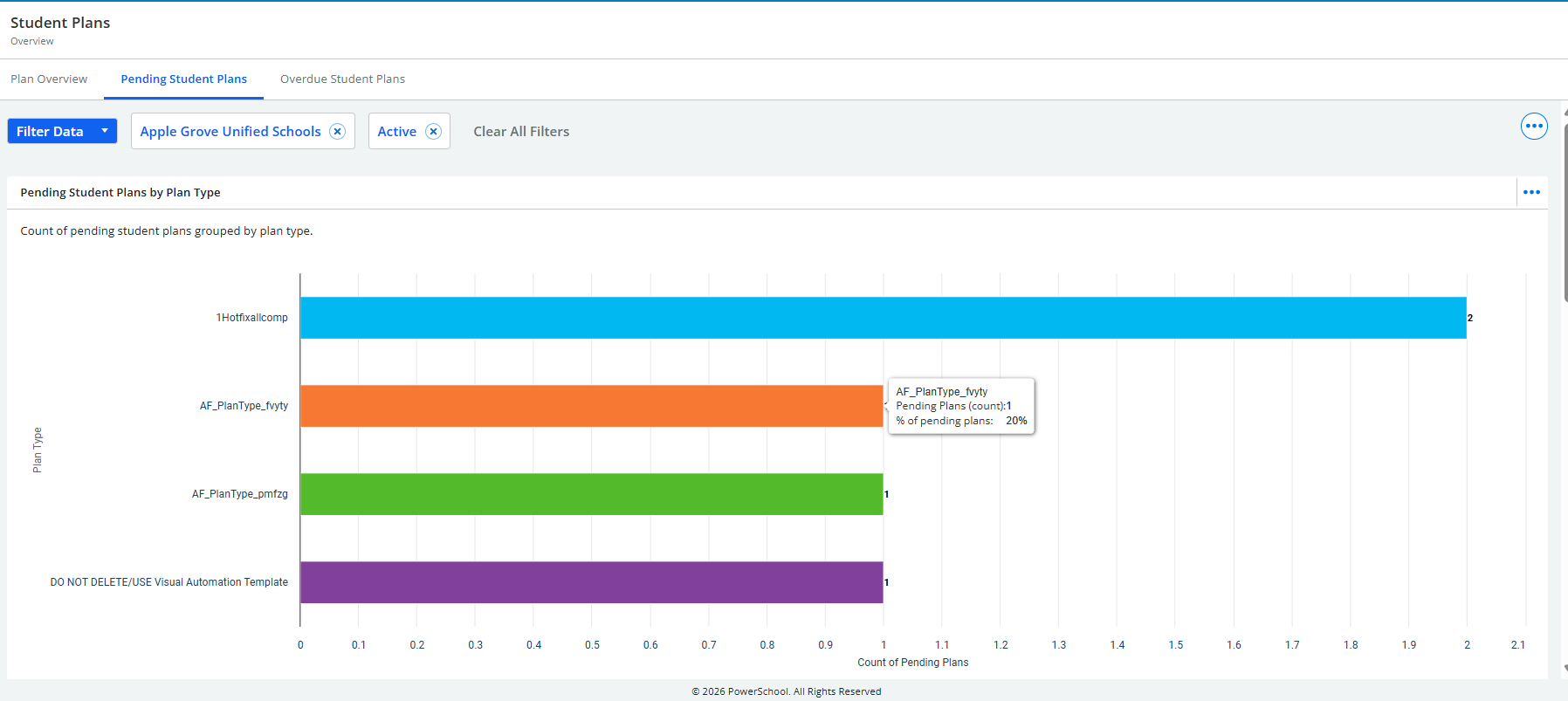
The Pending Student Plans Dashboard highlights plans that have been created but not yet started. These plans typically have a future start date. This dashboard helps staff identify upcoming work and ensure students receive timely support.
This dashboard displays:
-
Counts and percentages of pending plans by Plan Type, Plan Name, and Location.
-
Navigate to the Dashboard
Go to Student Plans and select the Pending Student Plans tab at the top of the page.
This opens the dashboard dedicated to plans that have been created but not yet activated. -
Apply Filters as Needed
At the top of the page, use the available filters to refine the data shown. These include:
-
School Selector – Choose a specific school or view district‑wide data.
-
Clear All Filters – Reset all filters to view the full dataset.
-
View Data and Drill down
-
Hover over a bar to view the exact count and percentage.
-
Select a bar to drill through to a detailed student list for the selected Plan Type / Plan Name / Location, using the current filters.
-
Access Student-Level Details
When drilling through, a list of students tied to the selected plan type appears.
From this list, you may:
-
Open a specific student record
-
Review plan details
-
Take plan‑related actions supported by the system outside the dashboard (e.g., activating a plan)
Note: The dashboard itself is metric‑only and does not include direct plan‑editing actions.