
PowerSchool Analytics & Insights version 25.10.2.0 is available as of .
Application | New features
|
Components |
Summary |
Release Note |
|---|---|---|
|
MTSS Interventions |
New Beta Feature: Intervention Notes Summary |
On the Notes page of an intervention, you can now view a consolidated summary of all notes across the intervention timeline. When a student filter is applied, the summary highlights notes for that student. Note: This feature is in beta and may not be available to all users. |
|
MTSS Interventions |
Beta Feature: Optimized Schedule Update Notifications |
Schedule update notifications for MTSS interventions are now grouped by timing into one consolidated alert per intervention, reducing inbox clutter and surfacing only the final updated schedule. Note: This feature is in beta and may not be available to all users. |
|
MTSS Interventions |
Beta Feature: Streamlined Student Removal Notifications |
Student removal notifications for interventions are no longer sent, keeping your activity feed focused on essential, actionable updates. |
|
MTSS Student Plans |
Save status indicator and navigation prompts |
A new save status indicator on the MTSS Student Plans edit page shows saving, saved, or error states, displays error notifications, and prompts you about unsaved changes before leaving the page. |
|
MTSS Student Plans |
MTSS Student Plans - Security access rights |
For customers who use Dev tools: We have added row-level-security to increase performance within MTSS Student Plans. All data‑level access is controlled directly within the application. Any time you need to add groups or assign users with different levels of access (beyond student access), make those changes in the app. Updates to the RLS bypass variables will not impact this application or its metrics. If you update the role itself—such as modifying or reassigning its permissions—it will remove the RLS bypass capability. For future changes, go to applications> student plans> rights 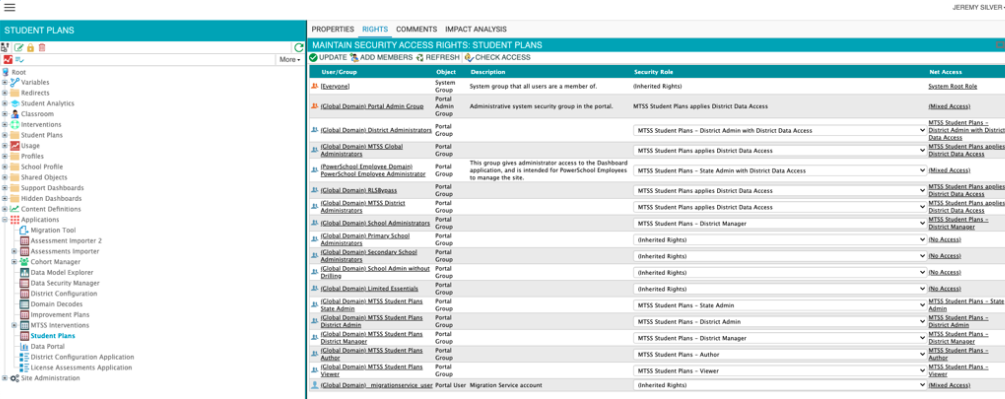
|
|
Enrollment Analytics |
Enrollment Dashboard Update |
Updated the Enrollment dashboard by removing the School Year filter from all sub-dashboards except Programs. |
Application | Resolved issues
|
Components |
Summary |
Release Note |
|
MTSS Interventions |
All interventions instructor filter |
Fixed an issue on the All Interventions page where results didn't show when searching or switching instructors. The filter now works properly, letting users search multiple instructors in a row without errors. |
|
MTSS Interventions |
Links Restored in Intervention Plans |
Fixed an issue where links in Intervention Plans and detail pages did not work. Users can now click URLs to open interventions or external resources directly. |
|
MTSS Student Plans |
Plans display correctly for withdrawn students |
Fixed an issue that prevented plans from appearing for withdrawn students. For affected customers, plans now display correctly on the student profile and plans page. |
|
Attendance Analytics |
Fix for “Absent Yesterday” metric on Attendance Dashboard |
Fixed an issue where the “Absent Yesterday” metric on the Attendance Dashboard showed 0 for some customers. The metric now correctly displays the number of students absent the previous day. |
|
Platform |
Accented and special character display issue is fixed. |
Fixed an issue where accented and special characters (e.g., é, è, ê, ë) did not display correctly. Analytics & Insights now preserves UTF-8 characters from PowerSchool SIS, ensuring accurate, readable dashboard filters, labels, and reports for affected districts. |
|
Manage Groups (UIHN) |
Dynamic Public Student Groups Filter Visibility Corrected for Impacted Customers |
Fixed an issue that blocked some customers’ dynamic public student groups from appearing as Student Group filters, restoring filter visibility. |
Dashboard content | Enhancements
|
Components |
Summary |
Release Note |
|---|---|---|
|
Assessments Analytics |
Updated benchmark legend ordering on Performance Indicator dashboard |
The benchmark legend on the Performance Indicator dashboard now orders test scores from highest to lowest. |
|
Community Engagement App |
Home tab navigation update |
Community Engagement clients can now navigate between the home tab and the educator preparation progress tab. |
|
Enrollment Analytics |
State-specific query updated for Connecticut |
Student 504 data will be pulled from S_STU_CRDC_X.Section504_YN instead of S_CT_STU_X.Section504_YN. |
|
Enrollment Analytics |
Revised special education indicator logic for Massachusetts |
Updated the Special Education (Special Ed) indicator logic to better align with the customer’s specific business rules. Consider {{SPED3TO5PLACEMENT = '00' or '01'}}as NOT SPED in S_MA_STU_SPED_X. |
Dashboard content | Resolved issues
|
Components |
Summary |
Release Note |
|---|---|---|
|
Intervention Analytics |
Intervention goal detail hover text |
Hover text in the Intervention Goal Detail tab shows properly spaced words and no longer includes unexpected special characters. |
|
Kickboard Analytics |
Resolved Discrepancies Between Behavior Support Data and Analytics & Insights |
Fixed an issue where Behavior Support interactions in Analytics & Insights did not match behavior data from Behavior Support. |
|
Risk Analysis Analytics |
On-Time Graduation Probability Display Issue Resolved |
For affected risk analysis customers, the on-time graduation probability now displays correctly. |